
How to Cancel Planet Fitness Membership Without Extra Fees (2026 Guide)
Canceling a gym membership shouldn’t feel like a legal battle. At Planet Fitness, however, the “No Judgment” zone has a very strict set of rules when it comes to leaving. If you miss a deadline by even 24 hours, you might find yourself paying for another month of gym time you don’t intend to use.
Planet Fitness uses a “paper trail” system. This means you can’t just stop showing up or delete the app to end your bill. You have to follow their specific steps to make sure your bank account stays protected.
To cancel a Planet Fitness membership, you must either visit your home club in person or send a written notice via certified mail. Planet Fitness does not allow cancellation through its app, website, or over the phone. To avoid being charged for the next month, you must cancel on or before the 10th.
Key Takeaways
- No Digital Exit: You cannot cancel via the app, website, or phone.
- The 10th is Key: This is the hard deadline to avoid the next monthly bill.
- Certified Mail Only: If you don’t go in person, certified mail is the only legal proof of cancellation.
- Contract Fees: Standard 12-month contracts often have a $58 buyout fee if ended early.
- Annual Fee Timing: These have a separate cutoff on the 25th of the month before they are billed.
Quick Answer: How to Cancel Right Now
If you are standing in front of your gym or looking for the fastest way out:
- In-Person: Go to the front desk of your “home” club and sign a cancellation form. Get a copy.
- By Mail: Send a letter with your name, address, and ID via USPS Certified Mail to your home club address.
The “10th of the Month” Rule: Why Timing is Everything
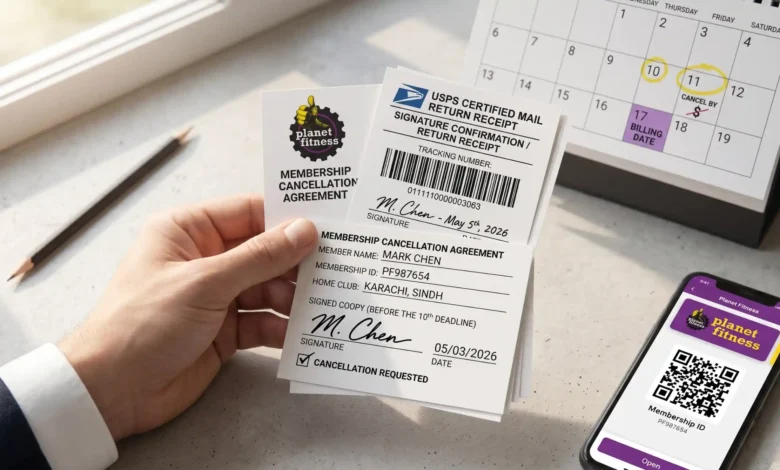
Timing is the most important part of this process. Planet Fitness typically drafts monthly dues from your account on the 17th of each month. However, their systems require a “notice period” to stop that draft.
To stop the 17th payment, the gym must receive your cancellation request by the 10th of that same month. If your letter arrives on the 11th, you will likely be billed one last time on the 17th.
Common Mistake: The “Standard Stamp” Trap Many members send a regular letter with a standard stamp. If the gym claims they never received it, you have no proof and will keep getting billed. Always use Certified Mail so you have a tracking number and a signature of receipt.
Pro Tip: If you are canceling by mail, send your letter by the 3rd of the month. This gives the post office time to deliver it and the gym staff time to process it before that 10th-of-the-month cutoff.
Option 1: The In-Person Method (Fastest)
Visiting your club in person is the most direct way to end your membership. You don’t have to wait for the mail, and you can get immediate confirmation.
Keep in mind that you must go to your Home Club. This is the specific location where you first signed up. While you can work out at other locations with a Black Card, only your home club has the authority to close your account.
Step-by-Step In-Person Cancellation:
Check your home club hours: Visit Planet Fitness Club Finder to verify when a manager or authorized staff member is on-site.
- Bring your ID: You will need a government-issued photo ID and your membership ID number (found in the PF app).
- Speak to the front desk: Tell them you want to cancel. They may offer to “freeze” your account instead; if you want to leave entirely, stay firm.
- Sign the form: The staff will print a cancellation document.
- Get the receipt: This is the most important step. Do not leave the building without a signed copy of the form or a physical receipt.
Pro Tip: If the staff tells you their “system is down” or they “can’t do it right now,” take down the name of the employee and the time. If they won’t provide a paper receipt, take a photo of the signed form on the desk with your phone as temporary proof.
Option 2: The Certified Mail Method (The “Paper Trail”)
If you cannot visit your home club, perhaps because you moved or work during their front-desk hours, sending a letter is your only legal alternative. However, dropping a standard envelope in a blue mailbox is a major risk.
Planet Fitness requires a “written notice.” To protect yourself, you should only use USPS Certified Mail. This service provides you with a tracking number and a signature of receipt, proving the gym received your request. Without this, you have no recourse if the gym continues to draft money from your account.
The Certified Mail Template
You can copy, paste, and print the following text. Be sure to fill in the bracketed information accurately.
[Your Full Name]
[Your Address]
[Your Phone Number]
[Date]
To: Planet Fitness Manager
[Home Club Address]
RE: Membership Cancellation – [Your Membership ID Number]
Dear Manager,
Please accept this letter as formal notice to cancel my Planet Fitness membership, effective immediately.
My membership ID is [ID Number], and the billing address associated with this account is [Your Address]. I am requesting that all future monthly drafts and annual fee charges be stopped.
Please send a written confirmation of this cancellation to my email at [Your Email] or to the mailing address listed above.
Sincerely,
[Your Signature]
[Your Printed Name]
Mini Case Study: The “Lost Letter” Scenario
A member in Ohio sent a standard letter on the 2nd of the month. The gym claimed it never arrived. Because the member had no tracking number, they were billed on the 17th and again the following month. By using Certified Mail for roughly $4.50, you gain the evidence needed to dispute these charges with your bank if the gym fails to act.
The Online “Loophole”: California and New York Members
While Planet Fitness states you cannot cancel online, there is a legal exception for residents of certain states. Under California’s Automatic Renewal Law (ARL) and similar laws in New York, if you signed up for your membership online, the business must allow you to cancel online.
- If you are a resident of these states:
- Log in to your account on the Planet Fitness website.
- Navigate to “Account” or “My Profile.”
- Look for a “Cancel Membership” button.
If you do not see this button and you live in a state with these protections, you should contact the FTC Consumer Protection Bureau to report the violation. For most other states, the “Click to Cancel” rule finalized by the FTC is still in the process of being fully implemented across all franchises.
Understanding Fees: Buyout vs. No-Commitment
One of the biggest surprises for members is the $58 buyout fee. This fee applies if you signed a 12-month contract and decide to leave before those 12 months are up.
If you have a “No Commitment” plan (often the $10 or $15 Classic plan), you can cancel at any time without paying this fee. If you have the Black Card, your contract terms depend on the specific promotion you signed up for.
Planet Fitness Cancellation Cost Matrix
| Plan Type | Buyout Fee | Cancellation Method | Best Advice |
| 12-Month Commitment | $58.00 | In-Person / Certified Mail | Wait until the 12th month if possible to avoid the fee. |
| No Commitment Plan | $0.00 | In-Person / Certified Mail | Cancel anytime before the 10th of the month. |
| Paid-In-Full Plan | $0.00 | In-Person / Certified Mail | No refund is typically given for unused months. |
Handling Annual Fee Charges
The annual fee is separate from your monthly dues. Most members are charged this fee once a year, usually in the same month they joined.
To stop this charge, your cancellation must be processed by the 25th of the month prior to the annual fee billing date. For example, if your annual fee is billed on April 1st, you must cancel by March 25th.
Summary: The Cancellation Checklist
- Identify your Home Club: You can only cancel where you signed up.
- Check the Date: Is it before the 10th (for monthly) or 25th (for annual)?
- Choose Your Method: In-person (free) or Certified Mail (approx. $4.50).
- Get Proof: A signed receipt or a USPS tracking signature is your “Get Out of Jail Free” card.
FAQs
Can I cancel Planet Fitness over the phone?
No. Planet Fitness policy requires a physical signature, which means you must cancel in person or via mail.
How do I find my Planet Fitness membership ID?
Your ID is available on the home screen of the Planet Fitness mobile app, directly under the “Check In” QR code.
What is the Planet Fitness buyout fee?
The standard buyout fee is $58. This applies only to members who are still within their initial 12-month contract period.
Can I cancel my membership at any Planet Fitness location?
No. Cancellations are handled by your “Home Club”, the specific location where you registered your account.
What happens if I just stop paying or block my credit card?
Do not do this. Planet Fitness may send your account to a third-party collections agency, which can damage your credit score. Always cancel officially.
Can I freeze my membership instead of canceling?
Yes. If you have a medical reason or are traveling, most clubs allow you to freeze your account for up to three months. Contact your club manager for the specific form.
Is there a way to cancel through the app?
Currently, no. The app is for tracking workouts and checking in; it does not have a cancellation feature for the majority of US members.
Conclusion
Leaving Planet Fitness requires more than just walking away. By timing your request before the 10th of the month and securing a signed receipt or tracking number, you can ensure your membership ends without surprise charges.
3 Next Steps:
- Open your PF app and find your Membership ID.
- Use the Club Finder to get the mailing address of your home club.
- Decide if you will visit in person this week or head to the post office for Certified Mail.
References
- Planet Fitness Official Customer Service — 2026
- Planet Fitness Membership Terms and Conditions — 2026
- Federal Trade Commission (FTC) “Click to Cancel” News — 2024
- California Legislative Information: Automatic Renewal Law — 2025