
Steal a Brainrot Unblocked: Controls & Base Strategy Guide
Viral sandbox games frequently get blocked on restricted school or work networks. Fortunately, web-based iterations keep the gameplay accessible.
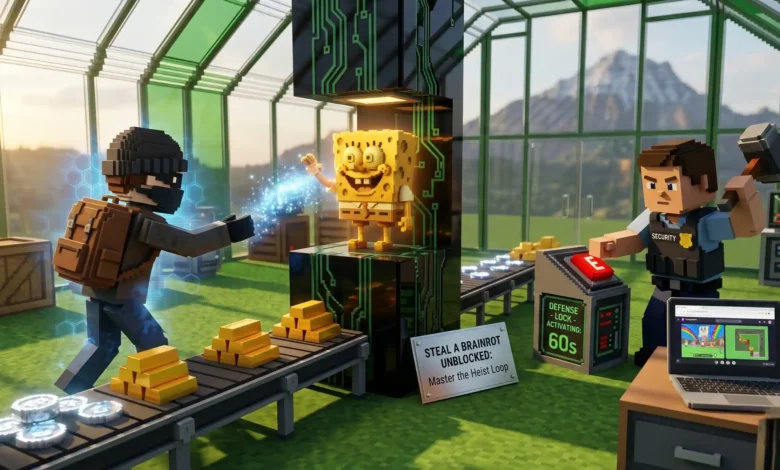
“Steal a Brainrot” merges digital tycoon mechanics with open base-raiding. Players collect meme characters to generate passive income while attempting to steal high-value assets from their neighbors.
You do not need to bypass network filters with sketchy downloads or unofficial files. Secure WebGL wrappers let you play directly in your browser, provided you understand the control translations and defensive timers.
Steal a Brainrot unblocked refers to standalone web browser versions of the popular meme-based tycoon game that bypass traditional network restrictions. Instead of using dedicated client software, these versions leverage HTML5 and WebGL engines to run directly inside applications like Google Chrome or Microsoft Edge without requiring local file installations.
Key Takeaways
- Originally developed as a multiplayer title by creator SpyderSammy.
- Secure web versions run safely on authorized portals without dangerous file downloads.
- Stealing high-tier characters heavily reduces your movement speed and limits your actions.
- Base defense relies on activating strict 60-second structural protection locks.
- The ‘G’ key acts as an instant emergency escape route during failed raids.
Quick Start Guide: Instant Play Check
-
Verify your browser has WebGL acceleration enabled in the system settings.
-
Clear your local cache partitions if you hit network errors when connecting to the matchmaking lobby.
-
Equip defensive weapons like the hammer before leaving your protected zone to explore.
Understanding the Core Gameplay Loop
The main goal is acquiring voxel characters, known as “Brainrots,” to build a passive income stream. You place these meme characters on base pillars, and they generate currency automatically.
Every player starts from scratch. You begin with a small amount of starting cash and a basic layout. Your first step is buying low-tier characters directly from the central red conveyor belt.
Typical scenario example: A new player buys a basic meme character from the red conveyor belt. They place it on a base pillar to generate early passive income. They wait until they can afford to activate a base lock before attempting to sneak into a neighboring layout to steal a better character.
Common Mistake: Leaving your base before your passive income covers the cost of a base lock. Always secure your own assets before trying to steal someone else’s.
Where to Access Steal a Brainrot Safely Online
Browser Hosting Solutions
You do not need to install the original Roblox client to play. Authorized publishers like Maxflow BV host standalone HTML5 versions.
The safest option for US school or work networks is “Steal Brainrot Online” hosted natively on CrazyGames. This platform provides a secure web wrapper without the risk of malware.
Mobile Framework Ecosystems
If you want to play away from a desktop, mobile iterations exist outside the browser. Verified applications inspired by the original format are available directly through the Google Play Store.
Downloading from official app stores prevents the security risks associated with third-party APK files.
The Mechanics of a Successful Base Raid
When you decide to lift a rival asset, you face an immediate tactical trade-off. Picking up a stolen item disables your ability to use other items and significantly reduces your walking speed. You become a slow, defenseless target.
Stealing also instantly alerts the base owner. If the owner spots you and strikes you with a defensive weapon like a hammer, you drop the stolen character. The item then instantly teleports back to its original base pillar.
Typical scenario example: A player attempts a raid and grabs a high-tier character. Because the stolen item slows the thief’s movement, the base owner easily catches up. The owner swings their hammer, hits the thief, and the stolen item vanishes, returning safely to the owner’s base.
Pro Tip: Always track your target’s relative field position across the map before stepping past their perimeter gates. Only attempt a heist when you see the owner exploring far from their home zone.
Desktop Keyboard Input Layout Matrix
Navigating unblocked browser ports requires knowing the direct key bindings, as there are no controller setups or touch screens available.
| Input Action | Key Mapping (PC) | In-Game Practical Outcome |
| Move Character | W, A, S, D | Standard spatial traversal throughout maps. |
| Jump / Vault | Spacebar | Bypassing small landscape borders and walls. |
| Base Interaction | E Key | Activating store menus and item placements. |
| Instant Return | G Key | Drops held item, teleports avatar back home. |
Mid-Article Summary: The 60-Second Defense Checklist
To maximize your progression, never leave your base undefended.
- Check Locks: Ensure your base lock shield is active.
- Verify Timer: Remember the shield only lasts for exactly 60 seconds before expiring.
- Equip Defense: Hold your hammer before walking out.
- Emergency Escape: If you get cornered in a rival’s base while attempting a heist, press the ‘G’ key immediately to teleport home and avoid the hammer.
Progression Systems: Rebirths and Upgrades
As your passive income grows, you will eventually hit a progression wall. This is where the “rebirth” mechanic comes into play. A rebirth allows you to sacrifice and reset your current base progress in exchange for permanent account upgrades.
These permanent bonuses include increased passive income multipliers, additional base slots, and stronger shop items.
Pro Tip: Prioritize rebirth upgrades that offer passive income multipliers before spending currency on expanding your base slots, as early-game slots fill up slowly. Additionally, do not trigger your progression resets while active world drop events are running; wait for baseline generation downtimes.
FAQs
Can I play Steal a Brainrot unblocked on a school Chromebook?
Yes. By using official WebGL portals, you can run the game directly in your browser without requiring file installations or desktop software downloads.
Who created the original version of Steal a Brainrot?
The game format was originally developed by SpyderSammy on sandbox multiplayer platforms in May 2025.
Why do I move so slowly when trying to steal a character?
Picking up an opponent’s character automatically triggers a movement speed debuff and prevents you from using other items while carrying it.
How long do base locks stay active to protect my items?
Standard structural base shield locks run on an exact 60-second expiration cooldown window.
What happens if the base owner hits me while I am stealing?
The character is dropped instantly and teleports back to its original pillar placement inside the owner’s base.
Is there an easy way to instantly get back to my base?
Yes. Pressing the ‘G’ key on a desktop setup activates an emergency home teleportation action, though you will lose any stolen item you are currently holding.
Are there versions of this game available on mobile devices?
Yes. Mobile configurations inspired by the original format can be acquired safely through the Google Play Store directory.
End Summary & Next Tactical Steps
Mastering the unblocked browser version of Steal a Brainrot relies on maintaining your defense windows, tracking movement speed limits, and capitalizing on secure web portals. Bypassing network restrictions is easy when you stick to trusted HTML5 environments.
Next Steps:
- Access an authorized WebGL host: Clear local browser constraints and load a trusted portal like CrazyGames to play safely.
- Finalize your generator layout: Purchase your foundational resources from the main red conveyor belt to start your passive income stream.
- Optimize your rebirths: Wait for the right moment to reset your progress so you can secure high-value passive income multipliers and outscale opposing bases.
References
- Roblox Wiki (Fandom), 2025
- CrazyGames, 2026
- Google Play Store, 2025/2026